$0.000/hr
Projected from Salad's latest rate
 Salad TrackerHosted Pro dashboard
Use your Salad Tracker account. A Pro-enabled extension must have synced data before this page can display your farm.
On iPhone, open this page in Safari, tap Share, then choose Add to Home Screen for an app-like shortcut.
Your earnings, machine health, and next milestones in one place.
Projected from Salad's latest rate
Account earnings
Account earnings
No machines collected
At the current hourly rate
Gross, before electricity
Pro monitoring required
Waiting for machine history
See who earns the most, spot idle machines, and plan what’s next.
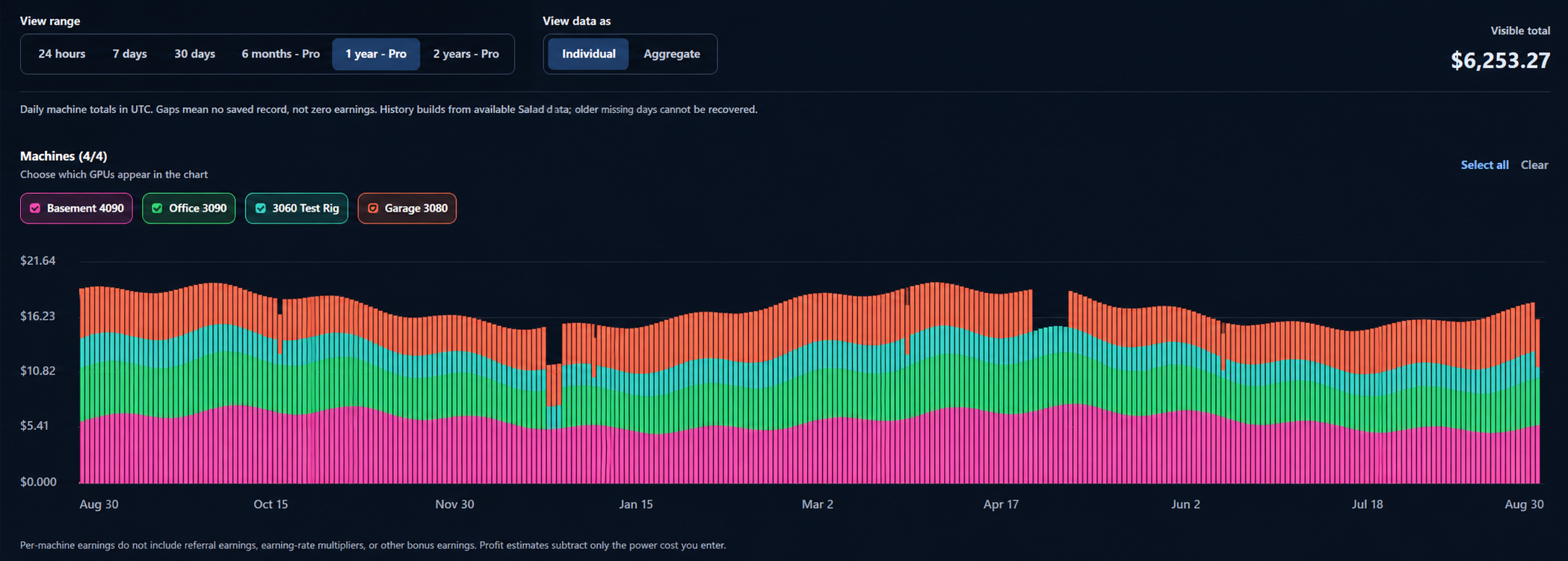
Daily machine totals in UTC. Gaps mean no saved record, not zero earnings. History builds from available Salad data; older missing days cannot be recovered.
Connect Pro rig monitoring to estimate electricity cost and net earnings.
Live power is NVIDIA-reported GPU draw. Energy and electricity cost use the whole-rig total, including the saved offset, allocated across GPUs by measured draw. Click a GPU row to open its dedicated analytics workspace.
Choose a monitored rig to inspect its power, profit, and hardware health over time.
This workspace becomes available after a Windows/NVIDIA monitor is paired to one of your Salad rigs. Your regular earnings report remains available without it.
Compare hourly demand and earning rates before choosing your next GPU.
Hourly observations · missing readings stay gaps.
Your account is free to create and keeps your preferences synced. No payment is required to get started. Pro is optional—see what it includes below.
Get long-range history, cross-PC sync, and alerts for rigs that need attention.
Feature requests and support: saladtracker@gmail.com
This immediately cancels Pro renewal without an automatic refund, deletes your Tracker account, cloud history, names and alert data on every PC, and signs out all sessions. Stripe retains required billing records. Local Free earnings and aliases remain in this browser.
Choose a feature to see the workflow and a focused preview. Pro is $15/month; cloud history and monitoring are optional and require your consent.
Switch between 6 months, 1 year, and 2 years, compare named GPUs, and find maintenance gaps or seasonal changes.
Salad collection runs automatically in the background. This controls whether this browser sends its locally collected earnings to cloud history and its rig observations to email monitoring.
Use Repair after a manual unpacked-extension update gets stuck. It resets only this browser’s Pro upload permission and reloads the extension; local earnings and account cloud history are kept.
Enable this only on a browser that should send data to Pro. If another PC is already uploading, leave this PC read-only; the hosted dashboard uses the account’s shared uploads at saladtracker.com/dashboard. Keep at least one signed-in Salad browser running to produce fresh data.
Connect a Windows/NVIDIA rig to add measured power and electricity cost to your dashboard.
Download the monitor from saladtracker.com/downloads, extract the ZIP, and run SaladTrackerMonitorSetup.exe on the rig. Enter this code within 10 minutes. The monitor stores only its device credential locally and uploads NVIDIA telemetry over HTTPS.
Windows/NVIDIA GPU name, VRAM, utilization, temperature, and NVIDIA-reported power draw. Salad Tracker adds the optional overhead watts and your electricity rate to estimate whole-rig cost. It does not read your Salad password, browser cookies, wallet, or files. Disconnect the rig here or remove its startup entry to stop it.
Cloud history stores daily per-machine earnings, machine IDs/names, and activity/downtime coverage for up to two years. Monitoring stores check-in times and earning/idle observations and delivery records for up to 30 days. The hosted dashboard projection additionally stores current and lifetime account balances, sanitized current machine state, recent hourly earnings, aliases, and the effective display settings needed to reproduce this dashboard. Machine identity uses your account + machine ID, never the name alone. No Salad passwords, cookies, or session tokens are uploaded.
Daily history uses UTC. Missing or conflicting observations stay unknown. Stopping Pro uploads on this browser keeps shared history available here and leaves other computers running. Pro expiry stops cloud access and email delivery; stored records age out under the same retention limits.
Email types, delay and pause apply across your account. Collection and delivery run about every five minutes. One email per incident, at most one per GPU per hour; no recovery emails. Pausing cannot recall an email already in flight. Resend handles delivery; accepted does not guarantee inbox delivery.
No recent emails.
Deletion affects this account on every PC and revokes the relevant upload permission. Local earnings remain. Provider logs/backups are not erased immediately.
Choose how your farm is tracked.
Runs automatically in the background and fetches current earnings into this browser’s local dashboard. It does not turn on cloud history or email alerts. Keep at least one Chrome browser signed into Salad and running for fresh data.
Sets when this dashboard labels a rig offline because Salad has not checked in. It affects dashboard status and downtime history only; email timing is set separately under Account & Pro.
Your all-in power rate. Saving it updates every connected Pro rig monitor; rig-specific watt offsets stay in GPU Analytics.
Pro: choose not-seen, no-earnings, or collection-unavailable alerts. Pause all emails any time.
Opt-in Pro daily history for up to two years.